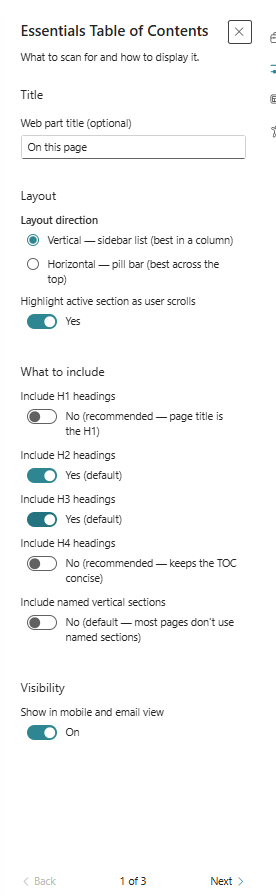
Essentials Table of Contents
Generate an automatic page table of contents based on heading structure.
Configuration Guide
- Add the Table of Contents web part to the page.
- Choose which heading levels to include.
- Set the display style and position.
- Configure smooth scrolling and anchor behaviour.
- Publish and verify the generated table of contents links.
Key Features Configuration
| Feature | Description | Configuration |
|---|---|---|
| Heading levels | Select which heading depths to include | Include H1-H6 headings |
| Anchor links | Generate clickable section jump links | Generate clickable section links |
| Display style | Choose the visual layout of the TOC | Configure TOC appearance |
| Scroll behaviour | Enable smooth scrolling to anchors | Smooth scrolling options |
Property Pane Options
| Option | Type | Description |
|---|---|---|
| Heading levels | Multi-select | Choose which heading levels to include |
| Style | Dropdown | Select TOC display style |
| Smooth scroll | Toggle | Enable smooth scrolling |
| Visibility | Toggle | Show or hide table of contents |
Illustration