Essentials Search Bar
The search entry point that writes queries to the URL for connected search experiences.
Configuration Guide
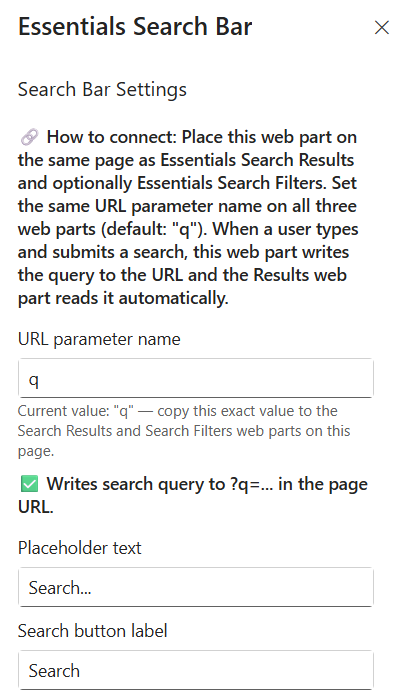
To configure the Essentials Search Bar webpart, edit your page, select the webpart, and open the properties pane on the right.
- How to connect — Place this webpart on the same page as the Essentials Search Results and optionally Essentials Search Filters webparts. Ensure the exact same URL parameter name is configured across all connected search webparts.
- URL parameter name — Set the key used in the URL query string (Default: q). Ensure this exact value is copied to your Search Results and Search Filters webparts on the page.
- Writes search query to URL indicator — Confirms that submitted queries will automatically append to the page URL parameter (e.g., ?q=...).
- Placeholder text — Customize the guide text displayed inside the search input box prior to typing (e.g., Search...).
- Search button label — Set the text rendered on the action button adjacent to the input field (e.g., Search).
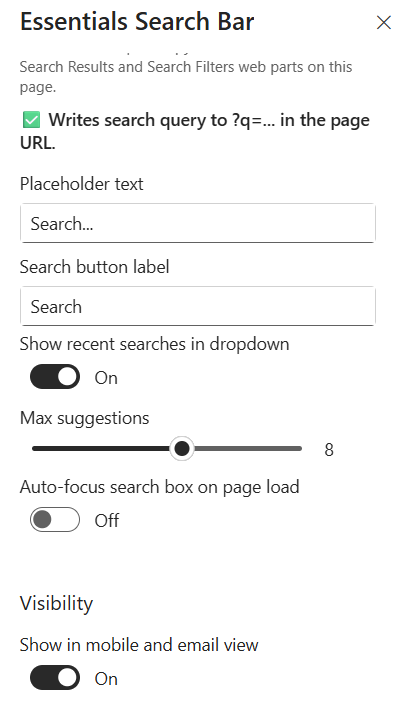
- Show recent searches in dropdown — Toggle On/Off to display a history dropdown of recent search queries as the user interacts with the search box.
- Max suggestions — Use the slider to set the maximum number of recent search suggestions visible in the dropdown menu (e.g., 8).
- Auto-focus search box on page load — Toggle On/Off to automatically place the cursor into the search input box immediately when the page loads.
- Show in mobile and email view — Toggle On/Off to control whether the search bar renders when accessed via mobile devices or email views.
Key Features Configuration
| Feature | Description | Configuration |
|---|---|---|
| How to connect | Placement across search webparts | Same page as Search Results and optionally Search Filters, same URL parameter |
| URL parameter name | Key used in the URL query string | Free-text field (default: q) |
| Placeholder text | Guide text inside the search input | Free-text field (e.g., Search...) |
| Search button label | Text on the action button | Free-text field (e.g., Search) |
| Recent searches | History dropdown of recent queries | Toggle On/Off |
| Max suggestions | Number of recent suggestions in the dropdown | Slider (e.g., 8) |
| Auto-focus | Cursor placement on page load | Toggle On/Off |
| Mobile & email view | Search bar rendering on mobile and email | Toggle On/Off |
Property Pane Options
| Option | Type | Description |
|---|---|---|
| URL parameter name | Text | Key used in the URL query string (default: q) |
| Writes search query to URL | Indicator | Confirms queries append to the page URL parameter (e.g., ?q=...) |
| Placeholder text | Text | Guide text inside the search input box |
| Search button label | Text | Text on the action button adjacent to the input field |
| Show recent searches in dropdown | Toggle | Display a history dropdown of recent search queries |
| Max suggestions | Slider | Maximum number of recent suggestions visible in the dropdown (e.g., 8) |
| Auto-focus search box on page load | Toggle | Automatically place the cursor in the input on page load |
| Show in mobile and email view | Toggle | Control whether the search bar renders on mobile devices or email views |
Illustration